

|
How do I create a maven plugin project using the archetype plugin?
Author: Deron Eriksson
Description: This tutorial describes how to create a maven plugin project using the archetype plugin.
Tutorial created using:
Windows Vista || JDK 1.6.0_04 || Eclipse Web Tools Platform 2.0.1 (Eclipse 3.3.1)
The mavenSW archetype plugin can be used to create several types of maven projects, including a plugin project. We can specify that the project that we'd like to create is a plugin project via the -DarchetypeArtifactId=maven-archetype-mojo parameter. I created an EclipseSW external tool configuration to create plugin projects:
The external tool configuration is shown here: 
I'll run the 'mvn archetype~create mojo' external tool configuration. I'm prompted for the groupId, which I specify as "com.maventest". 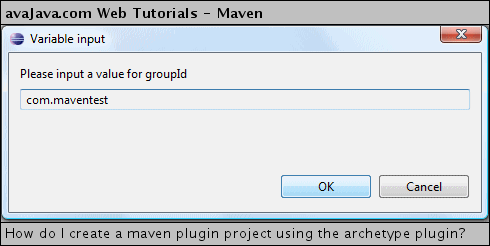
When prompted for the artifactId, I name the project "maven-howdy-plugin". 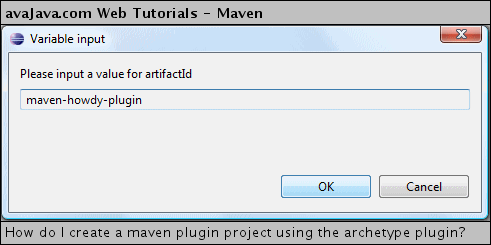
The console output of the external tool configuration is shown here: Console output from 'mvn archetype:create -DgroupId=com.maventest -DartifactId=maven-howdy-plugin -DarchetypeArtifactId=maven-archetype-mojo'
[INFO] Scanning for projects...
[INFO] Searching repository for plugin with prefix: 'archetype'.
[INFO] ------------------------------------------------------------------------
[INFO] Building Maven Default Project
[INFO]    task-segment: [archetype:create] (aggregator-style)
[INFO] ------------------------------------------------------------------------
[INFO] Setting property: classpath.resource.loader.class => 'org.codehaus.plexus.velocity.ContextClassLoaderResourceLoader'.
[INFO] Setting property: velocimacro.messages.on => 'false'.
[INFO] Setting property: resource.loader => 'classpath'.
[INFO] Setting property: resource.manager.logwhenfound => 'false'.
[INFO] **************************************************************
[INFO] Starting Jakarta Velocity v1.4
[INFO] RuntimeInstance initializing.
[INFO] Default Properties File: org\apache\velocity\runtime\defaults\velocity.properties
[INFO] Default ResourceManager initializing. (class org.apache.velocity.runtime.resource.ResourceManagerImpl)
[INFO] Resource Loader Instantiated: org.codehaus.plexus.velocity.ContextClassLoaderResourceLoader
[INFO] ClasspathResourceLoader : initialization starting.
[INFO] ClasspathResourceLoader : initialization complete.
[INFO] ResourceCache : initialized. (class org.apache.velocity.runtime.resource.ResourceCacheImpl)
[INFO] Default ResourceManager initialization complete.
[INFO] Loaded System Directive: org.apache.velocity.runtime.directive.Literal
[INFO] Loaded System Directive: org.apache.velocity.runtime.directive.Macro
[INFO] Loaded System Directive: org.apache.velocity.runtime.directive.Parse
[INFO] Loaded System Directive: org.apache.velocity.runtime.directive.Include
[INFO] Loaded System Directive: org.apache.velocity.runtime.directive.Foreach
[INFO] Created: 20 parsers.
[INFO] Velocimacro : initialization starting.
[INFO] Velocimacro : adding VMs from VM library template : VM_global_library.vm
[ERROR] ResourceManager : unable to find resource 'VM_global_library.vm' in any resource loader.
[INFO] Velocimacro : error using  VM library template VM_global_library.vm : org.apache.velocity.exception.ResourceNotFoundException: Unable to find resource 'VM_global_library.vm'
[INFO] Velocimacro :  VM library template macro registration complete.
[INFO] Velocimacro : allowInline = true : VMs can be defined inline in templates
[INFO] Velocimacro : allowInlineToOverride = false : VMs defined inline may NOT replace previous VM definitions
[INFO] Velocimacro : allowInlineLocal = false : VMs defined inline will be  global in scope if allowed.
[INFO] Velocimacro : initialization complete.
[INFO] Velocity successfully started.
[INFO] [archetype:create]
[INFO] Defaulting package to group ID: com.maventest
[INFO] ----------------------------------------------------------------------------
[INFO] Using following parameters for creating Archetype: maven-archetype-mojo:RELEASE
[INFO] ----------------------------------------------------------------------------
[INFO] Parameter: groupId, Value: com.maventest
[INFO] Parameter: packageName, Value: com.maventest
[INFO] Parameter: package, Value: com.maventest
[INFO] Parameter: artifactId, Value: maven-howdy-plugin
[INFO] Parameter: basedir, Value: C:\dev\workspace
[INFO] Parameter: version, Value: 1.0-SNAPSHOT
[INFO] ********************* End of debug info from resources from generated POM ***********************
[WARNING] org.apache.velocity.runtime.exception.ReferenceException: reference : template = archetype-resources/src/main/java/MyMojo.java [line 38,column 31] : ${project.build.directory} is not a valid reference.
[INFO] Archetype created in dir: C:\dev\workspace\maven-howdy-plugin
[INFO] ------------------------------------------------------------------------
[INFO] BUILD SUCCESSFUL
[INFO] ------------------------------------------------------------------------
[INFO] Total time: 1 second
[INFO] Finished at: Sun Feb 17 23:16:41 PST 2008
[INFO] Final Memory: 5M/9M
[INFO] ------------------------------------------------------------------------
The "maven-howdy-plugin" project gets created in my Eclipse workspace directory. Now I need to import it into Eclipse. I'll do this by right-clicking the Navigator View and selecting New → Project. 
I select 'Java Project'. 
I browse to the 'existing source' location, which is C:\dev\workspace\maven-howdy-plugin. I specify 'maven-howdy-plugin' to be the name of the project. I click Finish. 
The project now can be seen in Eclipse. 
The .classpath needs to be updated to contain the correct dependencies, so I'll perform a "mvn eclipse:eclipse" on the project. 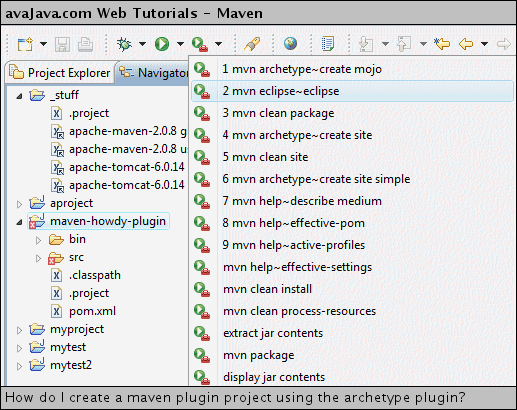
The output of "mvn eclipse:eclipse" on the "maven-howdy-plugin" project is shown here: Console output from 'mvn eclipse:eclipse'
[INFO] Scanning for projects...
[INFO] Searching repository for plugin with prefix: 'eclipse'.
[INFO] ------------------------------------------------------------------------
[INFO] Building maven-howdy-plugin Maven Mojo
[INFO]    task-segment: [eclipse:eclipse]
[INFO] ------------------------------------------------------------------------
[INFO] Preparing eclipse:eclipse
[INFO] [plugin:descriptor]
[INFO] Using 2 extractors.
[INFO] Applying extractor for language: java
[INFO] Extractor for language: java found 1 mojo descriptors.
[INFO] Applying extractor for language: bsh
[INFO] Extractor for language: bsh found 0 mojo descriptors.
[INFO] [eclipse:eclipse]
[INFO] Using source status cache: C:\dev\workspace\maven-howdy-plugin\target\mvn-eclipse-cache.properties
[INFO] Not writing settings - defaults suffice
[INFO] File C:\dev\workspace\maven-howdy-plugin\.project already exists.
       Additional settings will be preserved, run mvn eclipse:clean if you want old settings to be removed.
[INFO] Wrote Eclipse project for "maven-howdy-plugin" to C:\dev\workspace\maven-howdy-plugin.
[INFO]
[INFO] ------------------------------------------------------------------------
[INFO] BUILD SUCCESSFUL
[INFO] ------------------------------------------------------------------------
[INFO] Total time: 2 seconds
[INFO] Finished at: Sun Feb 17 23:20:07 PST 2008
[INFO] Final Memory: 5M/11M
[INFO] ------------------------------------------------------------------------
After the command has completed, the .classpath has been updated, so the errors in the project disappear. In addition, a target/classes build directory has been created, so I delete the bin directory. 
We now have a maven plugin project that we can work on in Eclipse. In case you're interested, I've included the generated pom.xml and MyMojo.java files here: pom.xml<project xmlns="http://maven.apache.org/POM/4.0.0" xmlns:xsi="http://www.w3.org/2001/XMLSchema-instance" xsi:schemaLocation="http://maven.apache.org/POM/4.0.0 http://maven.apache.org/maven-v4_0_0.xsd"> <modelVersion>4.0.0</modelVersion> <groupId>com.maventest</groupId> <artifactId>maven-howdy-plugin</artifactId> <packaging>maven-plugin</packaging> <version>1.0-SNAPSHOT</version> <name>maven-howdy-plugin Maven Mojo</name> <url>http://maven.apache.org</url> <dependencies> <dependency> <groupId>org.apache.maven</groupId> <artifactId>maven-plugin-api</artifactId> <version>2.0</version> </dependency> <dependency> <groupId>junit</groupId> <artifactId>junit</artifactId> <version>3.8.1</version> <scope>test</scope> </dependency> </dependencies> </project> MyMojo.java
package com.maventest;

/*
 * Copyright 2001-2005 The Apache Software Foundation.
 *
 * Licensed under the Apache License, Version 2.0 (the "License");
 * you may not use this file except in compliance with the License.
 * You may obtain a copy of the License at
 *
 *      http://www.apache.org/licenses/LICENSE-2.0
 *
 * Unless required by applicable law or agreed to in writing, software
 * distributed under the License is distributed on an "AS IS" BASIS,
 * WITHOUT WARRANTIES OR CONDITIONS OF ANY KIND, either express or implied.
 * See the License for the specific language governing permissions and
 * limitations under the License.
 */

import org.apache.maven.plugin.AbstractMojo;
import org.apache.maven.plugin.MojoExecutionException;

import java.io.File;
import java.io.FileWriter;
import java.io.IOException;

/**
 * Goal which touches a timestamp file.
 *
 * @goal touch
 *
 * @phase process-sources
 */
public class MyMojo
    extends AbstractMojo
{
    /**
     * Location of the file.
     * @parameter expression="${project.build.directory}"
     * @required
     */
    private File outputDirectory;

    public void execute()
        throws MojoExecutionException
    {
        File f = outputDirectory;

        if ( !f.exists() )
        {
            f.mkdirs();
        }

        File touch = new File( f, "touch.txt" );

        FileWriter w = null;
        try
        {
            w = new FileWriter( touch );

            w.write( "touch.txt" );
        }
        catch ( IOException e )
        {
            throw new MojoExecutionException( "Error creating file " + touch, e );
        }
        finally
        {
            if ( w != null )
            {
                try
                {
                    w.close();
                }
                catch ( IOException e )
                {
                    // ignore
                }
            }
        }
    }
}
Related Tutorials:
|